A VPN and a proxy can both place another server between you and a website. The important difference is what traffic they handle and how the connection is protected. A forward proxy relays the traffic configured to use it. A modern VPN establishes an encrypted tunnel for traffic routed through that tunnel, often covering several applications on a device.
Neither label guarantees anonymity, trustworthy operators, or protection from every online threat. To choose sensibly, identify the connection you want to change, the information you want to protect, and the company that will handle it. Mozilla’s VPN and web-proxy explanation
What a proxy actually does
A forward proxy receives a request from your application and communicates with the destination on its behalf. A browser might use a proxy while your email or video-call application connects directly. Organizations also use proxies to apply access rules and manage web traffic.
A reverse proxy serves a different purpose: it sits in front of a website’s servers and handles incoming requests. You do not gain personal browsing protection simply because a website uses one. Cloudflare’s explanation of forward and reverse proxies
The word proxy alone does not establish encryption. Ask whether the connection from your application to the proxy is encrypted, whether the destination connection uses HTTPS, and whether the proxy is configured to inspect traffic. Those are separate questions. EFF’s encryption guide
Three proxy configurations to distinguish
An HTTP proxy using CONNECT can create a tunnel to a destination. When the browser then uses HTTPS to that website, the website’s TLS connection runs through the tunnel. CONNECT itself does not add encryption to the client-to-proxy connection. RFC 9110, CONNECT
An HTTPS proxy adds TLS between the client and the proxy. That is a separate layer from HTTPS between the browser and a website: the proxy’s TLS endpoint and the website’s TLS endpoint are different. curl documents HTTPS proxy connections independently from destination TLS. curl proxy documentation
SOCKS5 supports relaying TCP connections and UDP traffic through a server, with an authentication-method negotiation. Its base specification does not guarantee encrypted application traffic; protection depends on the negotiated method and application protocols. “SOCKS5” alone is not a confidentiality promise. RFC 1928
What a VPN actually does
A VPN client creates a protected connection to a VPN server. Traffic selected for that route travels through the tunnel before continuing to its destination. For a consumer VPN’s internet traffic, the destination usually sees the VPN’s outgoing address rather than your original public address. An organization may instead use a VPN to give authorized users access to internal services. EFF’s VPN guide
Coverage depends on routing. With split tunneling, selected applications or destinations can travel outside the tunnel. An app or browser feature marketed as a VPN may also have a narrower scope than an operating-system VPN client. Read the actual coverage description rather than assuming every connection is included. Cloudflare’s split-tunnel documentation
VPN versus proxy at a glance
| Question | Forward proxy | Modern VPN |
|---|---|---|
| What uses the service? | Applications or traffic configured for the proxy | Traffic selected by the VPN’s routing rules |
| Is the connection encrypted? | Depends on the proxy protocol and configuration | The VPN tunnel is encrypted; HTTPS remains important beyond it |
| Does it affect other apps? | Only if they use the proxy | Often, but exclusions and split tunneling matter |
| Can the visible IP change? | Often, for the proxied request; forwarding settings matter | Usually, for internet requests exiting the VPN server |
| Who becomes an intermediary? | Proxy operator | VPN operator |
This table describes typical configurations, not a promise about a particular product. Mozilla explains the usual browser-versus-device distinction; Cloudflare documents the routing exceptions. Mozilla, Cloudflare
A connection walk-through
Consider a hypothetical laptop running a browser and a backup application:
| Configuration | Browser’s intended route | Backup application’s intended route |
|---|---|---|
| Browser-only forward proxy | Laptop → proxy → website | Laptop → backup service |
| VPN with both apps included | Laptop → VPN tunnel → VPN server → website | Laptop → VPN tunnel → VPN server → backup service |
| VPN with backup app excluded | Laptop → VPN tunnel → VPN server → website | Laptop → backup service |
Use this as a configuration worksheet. If your aim is to change both applications’ routes, a browser-only setting does not satisfy it. If you need only an approved proxy for one work application, changing the whole device’s route may be unnecessary.
HTTPS and a VPN protect different parts of the journey
HTTPS encrypts web communication between your browser and the website. A VPN adds a protected connection to the VPN server. For ordinary HTTPS traffic without TLS interception, a VPN operator cannot simply read your password or the page contents because it relays the connection. The operator can still observe connection information, subject to the protocols and configuration in use.
With plain HTTP, the VPN tunnel does not protect the onward connection after traffic leaves the VPN server. Keep HTTPS enabled and take certificate warnings seriously. On a managed device, approved inspection software can change this trust arrangement. EFF’s explanation of encryption boundaries
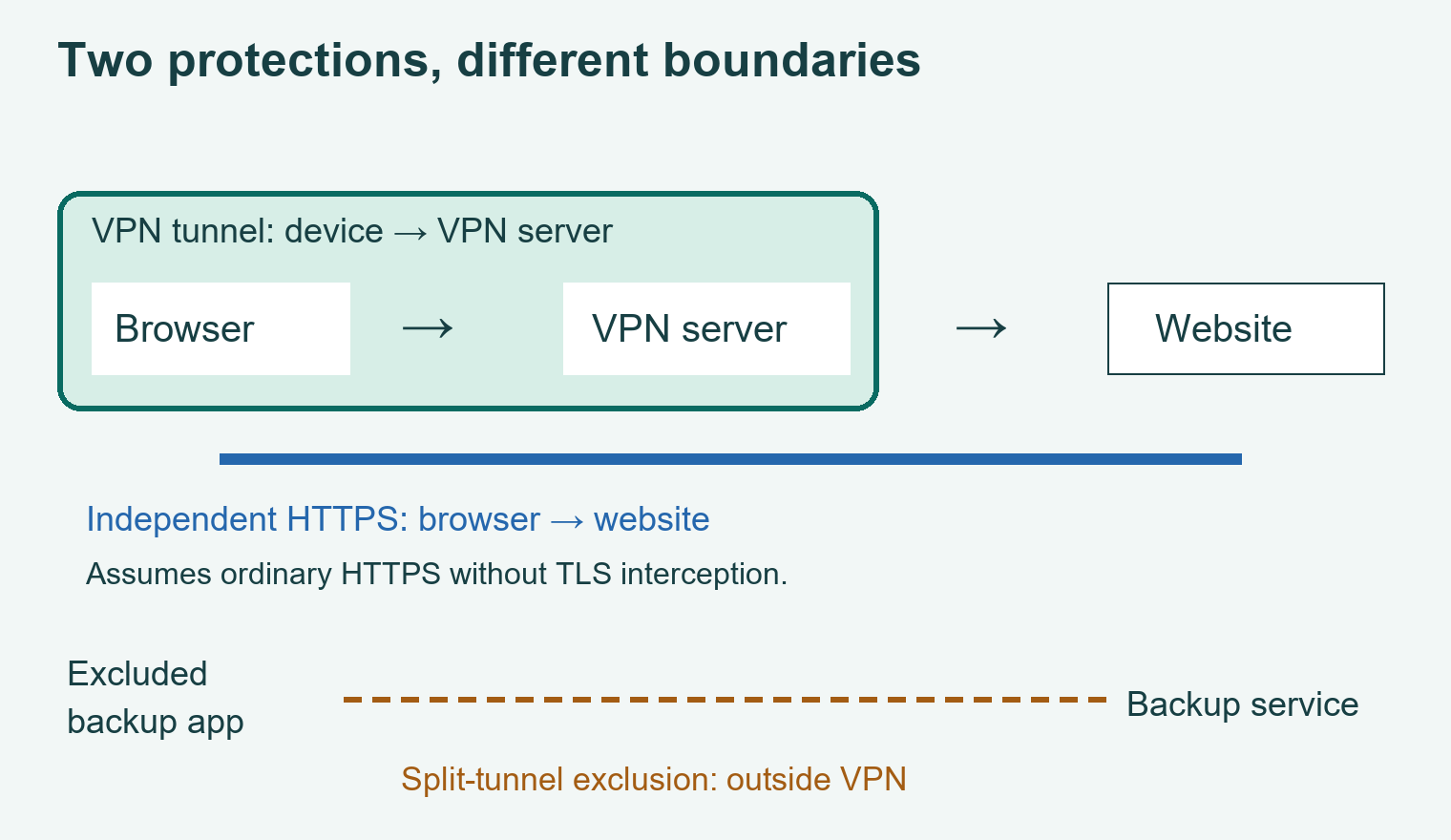
Original connection diagram. The HTTPS line represents a separate encryption boundary; it does not claim every VPN carries every app.
Which option fits your task?
Start with the outcome rather than a subscription:
- Accessing an employer’s internal system: use the connection method approved by its IT team. A consumer VPN is not a substitute for that access.
- Configuring a specific app to use an approved intermediary: use the app’s documented proxy settings and confirm which requests they cover.
- Changing the route for several apps: evaluate a device VPN and inspect exclusions before relying on it.
- Improving privacy on a shared connection: consider what HTTPS already protects and what additional metadata you want a VPN to shield from the local network.
Write a one-sentence requirement, such as: “I need my browser and backup application to use the same approved route.” It gives you something concrete to check after setup.
What either tool leaves unresolved
A different outgoing IP does not erase your account login, cookies, or other ways a service recognizes you. A VPN also does not make a fraudulent website trustworthy or stop you from voluntarily entering information into it. EFF cautions against treating VPNs as complete anonymity or security products. EFF’s VPN limitations
Evaluate the operator separately from the technology. Read its data-collection policy, identify the organization responsible for it, and examine the date and scope of any published audit. A useful question for support is: “Which connection records do you retain, for how long, and which traffic does this app exclude?” Save the answer alongside your settings.
A practical check after setup
- Record which apps and destinations are meant to use the service.
- Check the selected VPN profile or the application’s proxy configuration.
- Compare the browser’s visible public address before and after connecting, using WhatIsMyIP.com. Read the IPv4 and IPv6 fields separately and record any “not detected” result. This checks that request, not every application.
- Confirm exclusions against the provider’s documentation. A changed browser address does not prove that the backup app uses the tunnel.
- If an approved service fails, record the error and ask its administrator which route it supports before changing more settings.
The checker displayed an outward IPv4 address in a browser check on 8 October 2026; that visit did not test a VPN or other apps. This is a repeatable configuration check, not a security audit or a claim that a product has been tested here.
Frequently asked questions
Is a proxy faster than a VPN?
The label is insufficient to predict performance. Compare the same task on the same connection and record completion time, errors, and route. A service that finishes a download quickly may still perform poorly for another task.
Should I run a proxy and a VPN together?
Only when you understand the intended route. Combining them creates another configuration to diagnose. Document which service receives the request first and why the additional intermediary is needed.
Does a changed IP prove I am anonymous?
No. It shows the address visible for that request. Account and browser information can still identify you. EFF’s anonymity discussion
Glossary
| Term | Meaning |
|---|---|
| Forward proxy | An intermediary that handles configured client requests |
| VPN tunnel | A protected connection between a VPN client and server |
| Split tunneling | Routing selected traffic outside the tunnel |
| HTTPS | Encrypted web communication using TLS |
Key takeaways
Choose by scope, encryption boundaries, and operator trust. Verify the applications that matter to your task, and keep HTTPS and account protection in place.
For more context, read our general VPN guide and passkeys and account-security guide.
Editorial note: Prepared from the linked technical documentation and digital-security guidance, checked on 8 October 2026. The connection worksheet is an original teaching example. No provider rankings, speed tests, or independent product audit are claimed. See our Editorial Policy and contact us with corrections.
About the editor: Kshitij Gupta is a digital marketing specialist whose profile lists experience in SEO, copywriting, and blogging. He prepares these guides for a general audience using the technical sources linked in each article.
Written and prepared by Kshitij Gupta.